
Scripting Guide - CKMud Android Client
Create and manage aliases, triggers, timers, and variables
📑 Table of Contents
Aliases
An alias is a user-defined command that expands into one or more other commands. Use aliases to save typing for frequently-used sequences.
Creating an Alias
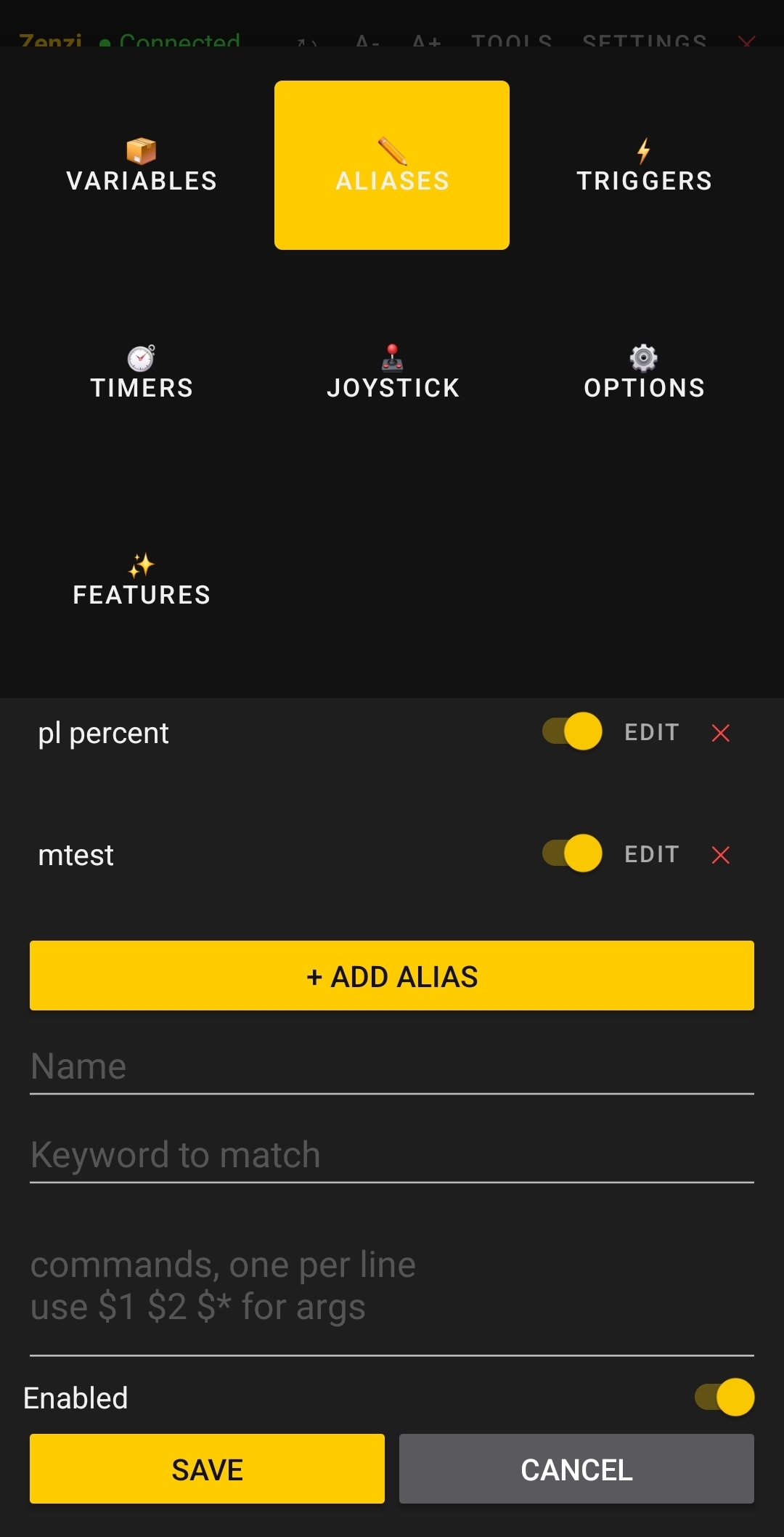
- Tools → Aliases tab
- Tap + Add Alias
- Enter details:
- Name: The command you type (e.g.,
pl) - Alias: Exact match (usually same as Name)
- Commands: What to execute (can use variable substitution, special commands, etc.)
- Name: The command you type (e.g.,
- Tap Save
Simple Example
Name: pl
Alias: pl
Commands: #note PL: @msdp.POWERLEVEL / @msdp.POWERLEVEL_MAX

Usage: Type "pl" in terminal
Result: Displays PL: 500000 / 1000000 (or whatever your values are)
Multi-Command Alias
Name: buffs
Alias: buffs
Commands: focus 'energy shield'; focus 'zanzoken'; focus 'herculean force'

Usage: Type "buffs"
Result: Focuses all three focus skills in sequence
Alias with Substitution
Name: status
Alias: status
Commands: #note PL: @msdp.POWERLEVEL | Ki: @msdp.KI | Fatigue: @msdp.FATIGUE

Usage: Type "status"
Result: Shows all three vitals on one line
Persistence
- Aliases are saved per character
- Survive app restart and backgrounding
- Stored as JSON in SharedPreferences
Triggers
A trigger is an automatic response to incoming text. When a line matches a trigger pattern, the trigger's commands execute automatically.
Creating a Trigger
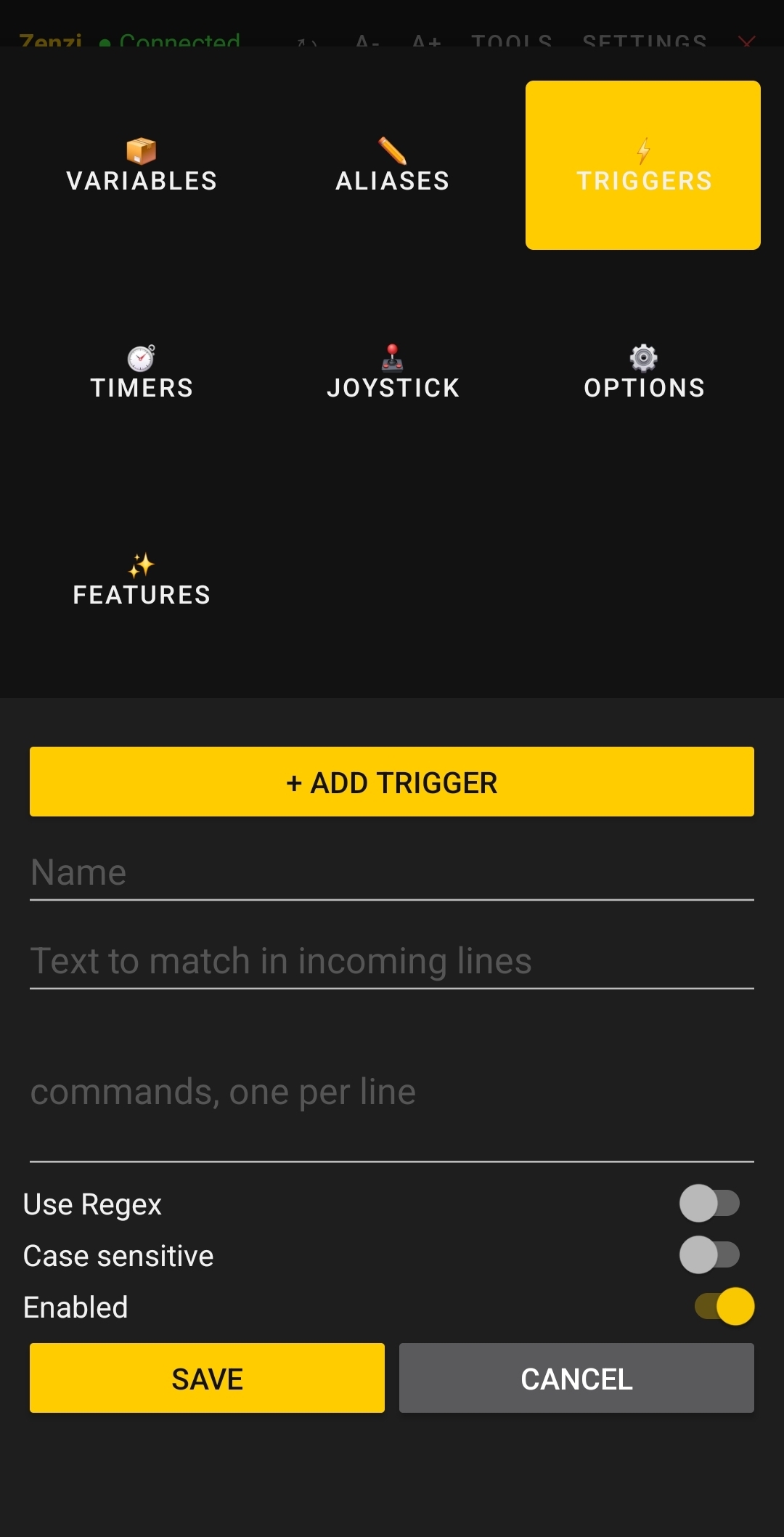
- Tools → Triggers tab
- Tap + Add Trigger
- Enter details:
- Pattern: Text to match (plain text or regex)
- Use Regex: Toggle for regex mode (capture groups)
- Commands: What to execute when matched
- Tap Save
Plain Text Trigger
Pattern: You arrive at the Inn
Use Regex: OFF
Commands: look; stand

When matched: Any line containing "You arrive at the Inn"
Execution: Automatically look and stand
Regex Trigger (Capture Groups)
Pattern: takes (\d+) damage
Use Regex: ON
Commands: #math {total_dmg} {@total_dmg + %1}; #note Damage: %1 (Total: @total_dmg)

When matched: "Enemy takes 150 damage"
Captured: %1 = "150"
Execution: Adds 150 to total_dmg, displays both values
Multiple Capture Groups
Pattern: (\w+) gains (\d+) experience from (\w+)
Use Regex: ON
Captured: %1 = character, %2 = exp amount, %3 = creature

Commands:
#math {total_exp} {@total_exp + %2}
#note %1 gained %2 exp from %3 (Total: @total_exp)
Regex Tips
- \d+ — Match digits (numbers)
- \w+ — Match word characters (letters, numbers, underscore)
- .* — Match any characters
- (group) — Capture group (accessed as %1, %2, etc.)
- ^text — Match at start of line
- text$ — Match at end of line
Persistence
- Triggers are saved per character
- Survive app restart
- Stored as JSON with regex flag
Timers
A timer is a command that executes repeatedly at a fixed interval.
Creating a Timer
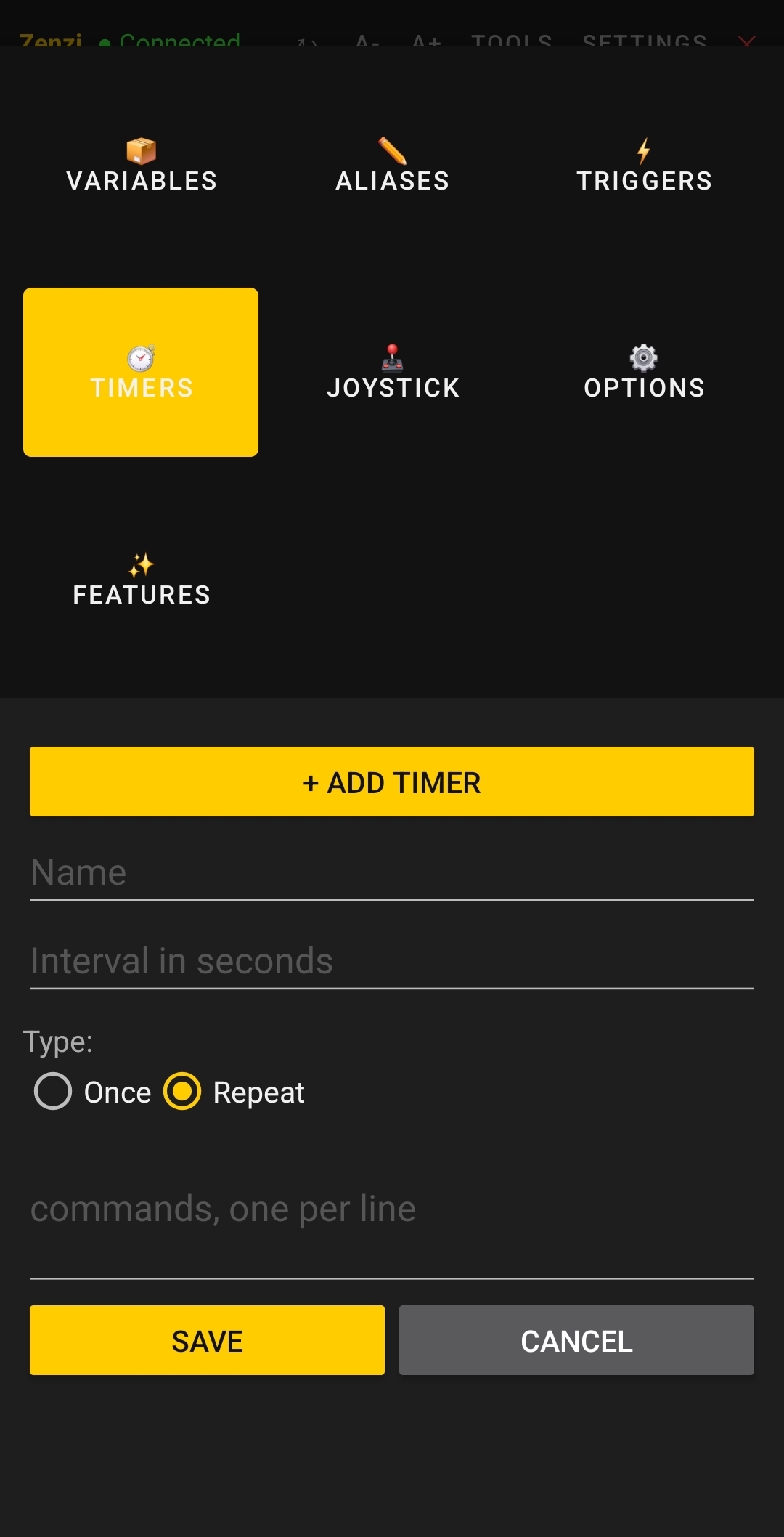
- Tools → Timers tab
- Tap + Add Timer
- Enter details:
- Name: Display name for the timer
- Interval: Seconds between executions
- Commands: What to execute
- Tap Save
Simple Timer
Name: Regeneration
Interval: 60 (seconds)
Commands: focus 'invigorate'

Execution: Every 60 seconds, focus invigorate
Status Check Timer
Name: Check Health
Interval: 30
Commands: #note PL: @msdp.POWERLEVEL / @msdp.POWERLEVEL_MAX

Execution: Every 30 seconds, display power level
Timer with Conditional
Name: Emergency Heal
Interval: 10
Commands: #if {@msdp.POWERLEVEL < 500000} {focus 'invigorate'}

Execution: Every 10 seconds, check if PL is low and heal if needed
Timer Notes
- Interval is in seconds: Minimum 1, maximum 3600 (1 hour)
- Precision: Best-effort scheduling; may be delayed by system
- Background execution: Timers run even when app is backgrounded (if background connection enabled)
- Per-session: Each character has independent timers
Variables
Variables are named data containers. Use them to track state, store temporary values, or accumulate counters.
Two Types
| Type | Created | Persistence | Display Color |
|---|---|---|---|
| Temporary | Terminal: #var name value |
Lost on app restart | White |
| Persistent | Tools → Variables tab | Saved per character | Cyan |
Creating a Persistent Variable
- Tools → Variables tab
- Tap + Add Variable
- Enter:
- Name: Variable name (no spaces)
- Value: Initial value
- Tap Save
Creating a Temporary Variable
Type in terminal:
#var myvar 10           // Create variable
#var myvar 20           // Update variable
#note @myvar            // Display: 20
Viewing All Variables
Type in terminal:
#var

Output:
kill_count: 42 (cyan = persistent)
myvar: 20 (white = temporary)
Variable Substitution & Special Syntax
Variable Reference
| Syntax | What It Means | Example | Context |
|---|---|---|---|
@varname |
Session variable value | say @greeting |
Aliases, triggers, timers, terminal |
@msdp.KEY |
MSDP server value | #note PL: @msdp.POWERLEVEL |
Any command |
%1, %2, ... |
Regex capture groups | #math {x} {%1} |
Triggers only (when regex enabled) |
$1, $2, $* |
Alias arguments | alias greet say $* |
Aliases only |
Undefined Variables
- If you reference a variable that doesn't exist, it defaults to empty string ("")
- In math operations, empty defaults to 0
Example: Multi-Variable Substitution
Create variables:
#var greeting "Hello"
#var target "Zenzi"

Create alias:
Name: greet
Commands: say @greeting, @target!

Usage: Type "greet"
Result: Say "Hello, Zenzi!"
Special Commands
These commands work in aliases, triggers, timers, and terminal input:
#var — Create/Update Variables
#var name value             // Create or update temporary variable
#var {myvar} {hello}        // Braced format (more explicit)
#var {count} {@count + 1}   // Can reference other variables
#math — Evaluate Expressions
Arithmetic with substitution:
#math {x} {5 + 3}                    // x = 8
#math {total} {10 * 2}               // total = 20
#math {pct} {(@health * 100) / @max} // With variables
Supported operators: + - * /
#math {x} {5 + 3} stores 8, not 8.0. Division is integer division: #math {x} {9 / 2} = 4.
#note — Display Text
Print formatted text to the terminal (not sent to server):
#note Hello World
#note PL: @msdp.POWERLEVEL / @msdp.POWERLEVEL_MAX
#note Damage taken: %1
Use cases: Status displays, debug info, conditional feedback, parsing feedback
#if — Conditional Execution
Triggers and aliases only (not terminal). Execute commands based on a condition:
#if {@msdp.POWERLEVEL < 500000} {focus heal}
#if {@damage == 0} {#note No damage}
#if {@combo > 10} {#note MASSIVE COMBO!}
Supported operators: < > <= >= == !=
Multiple Commands in #if
Separate with semicolons on one line:
#if {@msdp.POWERLEVEL < 300000} {focus 'invigorate'; #note CRITICAL!; say Help me}
} must be immediately after the last command (no separate line). Use semicolons to separate multiple commands.
Practical Examples
Example 1: Power Level Display Alias
Name: pl
Alias: pl
Commands: #note PL: @msdp.POWERLEVEL / @msdp.POWERLEVEL_MAX

Usage: Type "pl"
Result: PL: 500000 / 1000000
Example 2: Damage Tracking Trigger
Pattern: takes (\d+) damage
Use Regex: ON
Commands: #math {total_dmg} {@total_dmg + %1}; #note Damage: %1 (Total: @total_dmg)

When server says: "You take 150 damage"
Execution: Adds 150 to total, displays both values
Example 3: Low Power Warning Trigger
Pattern: PL drops below
Use Regex: OFF
Commands: #if {@msdp.POWERLEVEL < 1000000} {focus 'invigorate'; #note WARNING: Low PL!}

When server says: "Your PL drops below 500000"
Execution: If PL is still below 1M, focus invigorate and display warning
Example 4: Auto-Buff Timer
Name: Buff Every Minute
Interval: 60
Commands: focus 'energy shield'; focus 'barrier'; focus 'zanzoken'

Execution: Every 60 seconds, focus all three buff skills
Example 5: Experience Tracker
- Create persistent variable:
total_exp = 0 - Create trigger:
Pattern: You gain (\d+) experience Use Regex: ON Commands: #math {total_exp} {@total_exp + %1}; #note Total: @total_exp exp - Create alias to display:
Name: exp
Alias: exp
Commands: #note Total Experience: @total_exp
Example 6: Status Line Alias
Name: status
Alias: status
Commands: #note ━━━━━━━━━━━━━━━━━━━━; #note PL: @msdp.POWERLEVEL / @msdp.POWERLEVEL_MAX; #note Ki: @msdp.KI / @msdp.KI_MAX; #note Fatigue: @msdp.FATIGUE; #note ━━━━━━━━━━━━━━━━━━━━

Usage: Type "status"
Result: Formatted status box with all vitals
Example 7: Smart Heal Trigger
Pattern: your PL drops below (\d+)
Use Regex: ON
Commands: #math {needed} {%1 - @msdp.POWERLEVEL}; #if {@msdp.POWERLEVEL < %1} {focus 'invigorate'; #note Healing! (%1 needed)}

When matched: "your PL drops below 400000"
Captured: %1 = 400000
Execution: If PL is below 400k, focus invigorate and show how much healing is needed