CKMud Android Client
Native MUD client for Android • Multi-MUD support • TinTin-like scripting • v1.309
Get started with the client
Interface layout + all features (scripting, channels, MSDP, and more)
Aliases, triggers, timers, variables
Reference and practical examples
📑 Table of Contents
Overview
The CKMud Android Client is a native MUD client built for mobile devices. It provides a full-featured terminal emulator with advanced scripting capabilities, supporting multiple simultaneous connections and rich customization options.
What You Can Do
- Play Multiple Characters: Connect to up to 16 different servers/characters simultaneously, switching between them instantly
- Advanced Scripting: Create aliases, triggers, timers, and variables with TinTin-like syntax, regex support, and conditional logic
- ANSI Terminal: Full VT100 emulation with color, bold text, and 5000-line scrollback buffer
- Persistent State: All scripts, variables, and settings are saved per character and survive app restart
- Auto-Updates: Seamless in-app APK distribution without Play Store dependency
- Dual Joystick: 8-directional movement with 5 visual styles and customizable commands
- Channel System: 9 built-in channels (OOC, Chat, Quest, Event, Raid, Clan, Auction, Group, Tell) plus unlimited custom regex channels
- Multi-MUD Compatibility: Works on CKMud and any standard MUD; feature gates for CKMud-specific UI (vitals, combo, opponent bar)
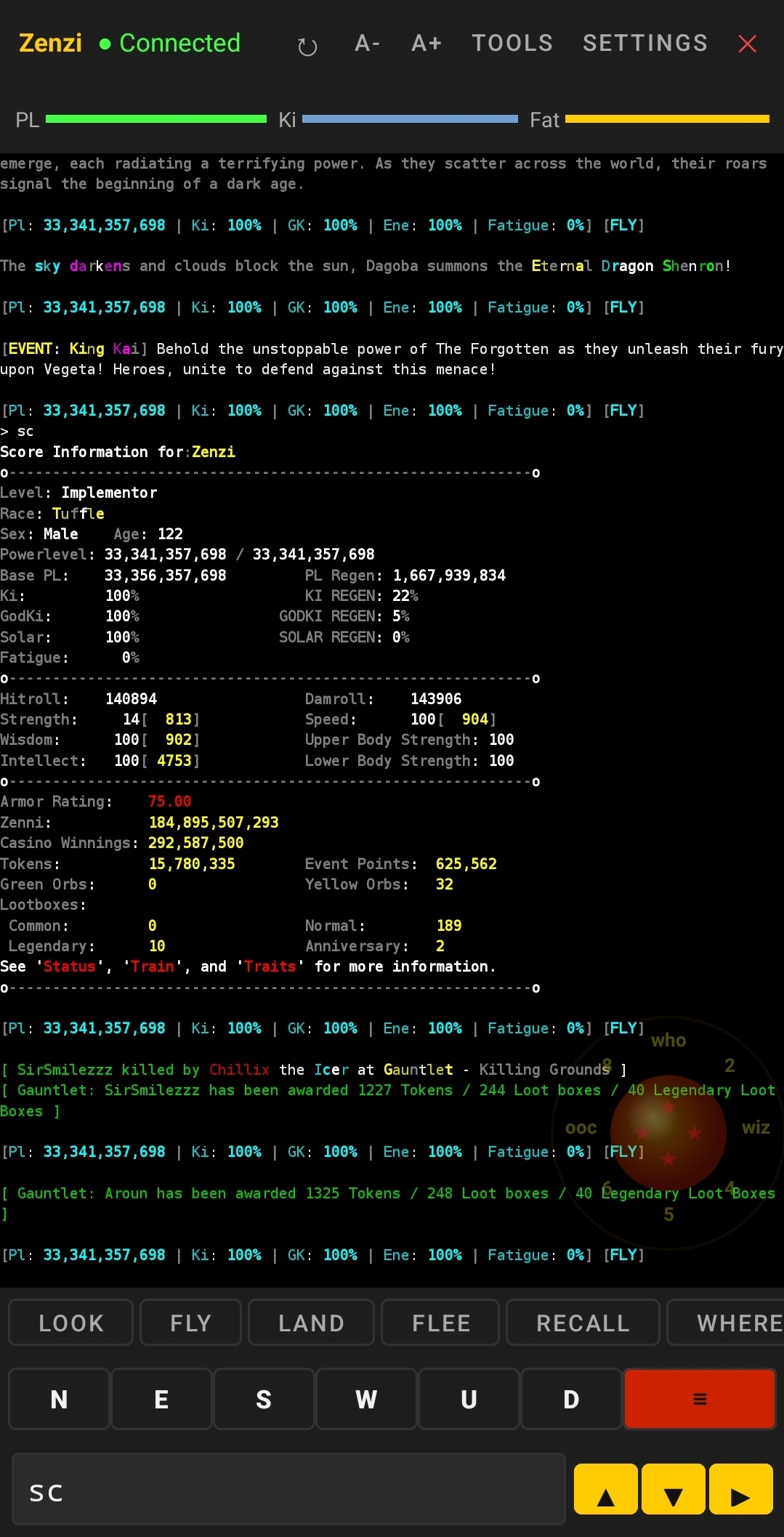
Key Highlights
⚙️ Full Terminal Emulator
ANSI color, bold, 5000-line buffer, split-mode scrolling, ANSI-aware word wrapping
🎮 Input Methods
Keyboard, 4 direction buttons, dual joystick, command history with smart prefix filtering
📜 Script System
Aliases, regex triggers with captures, timers, variables, #math, #if conditionals
📊 MSDP Protocol
Auto-discovers all server variables; reference with @msdp.KEY syntax
💬 Chat Channels
9 default channels, custom regex patterns, popup notifications, chat drawer
⚡ Multi-Session
16 simultaneous connections, instant switching, per-session settings and scripts
🎨 Vitals & Combat
PL/Ki/Fatigue bars, opponent health, combo counter (CKMud), toggleable per-session
🔄 Auto-Update
Silent version check, in-app download and install, no Play Store needed
⚡ Auto-Buff
Automatically focus buff skills when their effects expire, keeping you constantly buffed
🔮 Autowish
Automatically use dragon ball wishes on a configurable schedule
Quick Start
Creating Your First Alias
- Launch the CKMud app and select or create a character
- Tap Tools in the top toolbar (≡ button)
- Tap the Aliases tab
- Tap + Add Alias
- Enter:
- Name:
pl - Alias:
pl - Commands:
#note PL: @msdp.POWERLEVEL / @msdp.POWERLEVEL_MAX
- Name:
- Tap Save
- Type
plin the terminal and press Enter
First Terminal Commands
Type these in the input box to explore:
#help                    // Show all terminal commands
#var                     // List all variables (cyan = persistent)
#msdp                    // Show all MSDP data from server
#msdp KEY                // Show a specific MSDP value (e.g., #msdp POWERLEVEL)
Download & Install
Requirements
- Android 8.0+ (API level 26)
- ~20 MB free space for APK and data
- Internet connection for MUD and auto-updates
Installation Steps
- Download ckmud.apk from ckmud.com/files/ckmud.apk
- On your Android device, go to Settings → Apps → Special app access → Install unknown apps and enable it for your browser or file manager
- Open the downloaded APK file and tap Install
- When complete, tap Open to launch CKMud
First Connection
- Tap + Add Character on the character selection screen
- Enter character name, server address (e.g.,
ckmud.com), and port (default:8500) - Tap Connect
- The app will negotiate with the server and display the login prompt
Latest Changes (v1.309)
v1.309 - March 20, 2026
- ✅ #help command - displays all available terminal commands and syntax reference
- ✅ Color-coded variables - persistent variables shown in cyan in #var display
- ✅ Full multi-session support with independent scripts per character
- ✅ Complete feature gate system for multi-MUD compatibility
v1.308 - March 20, 2026
- Fixed #note newline rendering
- Proper byte-size handling for terminal output
v1.307 - March 20, 2026
- Fixed CommandProcessor syntax parsing
- Support for both braced and unbraced command formats
v1.300+ - March 2026
- Full TinTin-like scripting system with variables, aliases, triggers, timers
- Regex trigger support with capture groups
- MSDP protocol with dynamic variable discovery
- Expression evaluation (#math) and conditional execution (#if)
- Multi-session architecture (up to 16 simultaneous connections)
- Channel system with custom regex patterns
- Per-session joystick configuration
- In-app auto-update system
- Full ANSI/VT100 terminal emulation
- Keepalive mechanism to prevent idle socket drops
- NAWS protocol support for proper terminal sizing
For a complete guide covering the interface and all features, see the Complete Guide.
Next Steps
Ready to dive deeper? Check out these guides:
- Complete Guide - Full interface walkthrough, feature explanations, scripting system, channels, multi-session, MSDP, and more
- Scripting Guide - Create and manage aliases, triggers, timers, and variables with practical examples
- Commands & Examples - Full command reference, syntax guide, practical examples, and FAQ